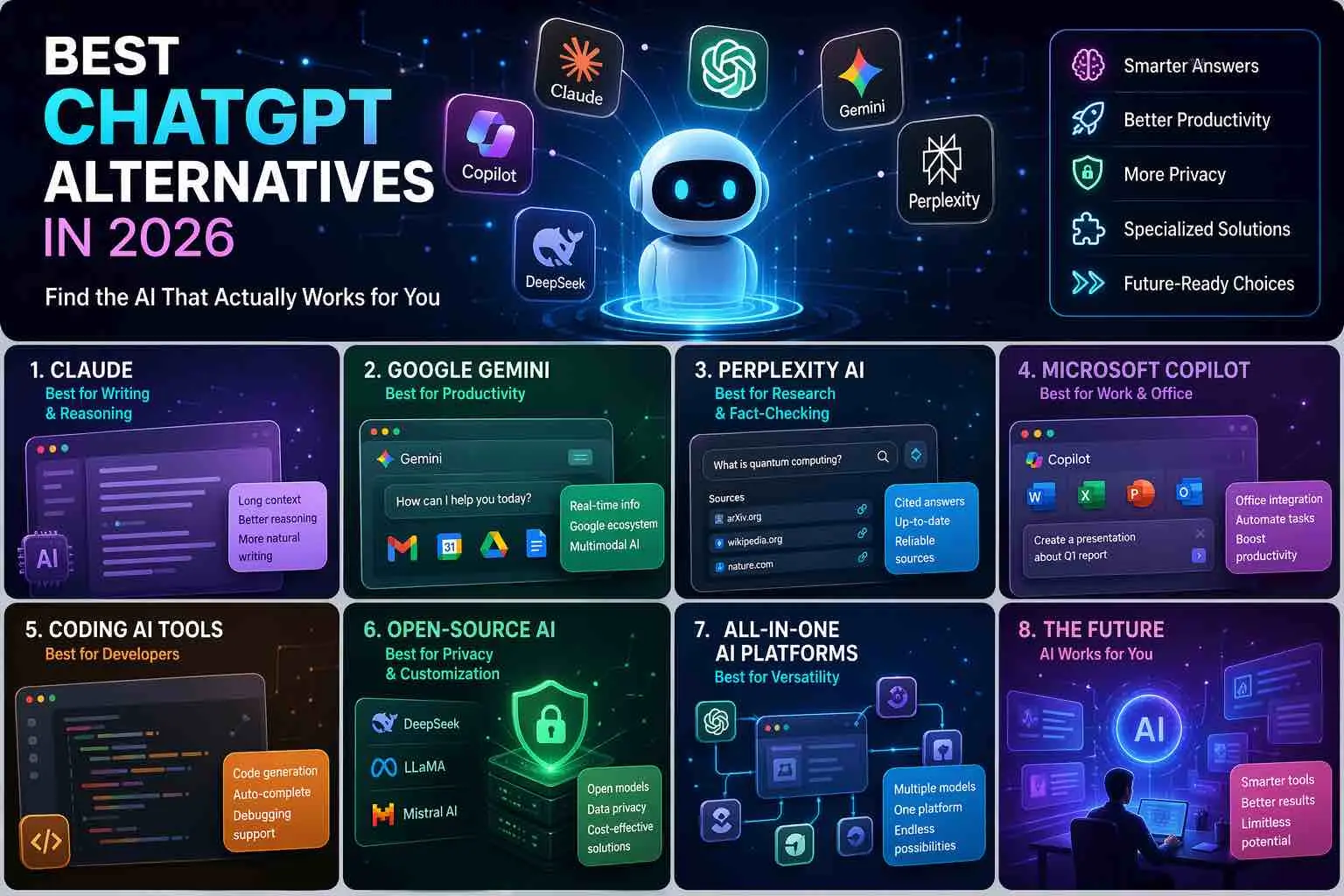
Best ChatGPT Alternatives in 2026: Find the AI That Actually Works for You
You opened a tab, typed your question, and waited. The response came back sounding like it was written by a tired intern copying from a Wikipedia article. Or worse — ChatGPT was down entirely, right when your deadline was breathing down your neck.
If that sounds familiar, you’re in good company.
Millions of people are quietly moving on, not because ChatGPT is bad, but because they’ve realized one tool rarely fits every job. The AI landscape in 2026 looks nothing like it did two years ago. The competition has exploded, and honestly? Some of these ChatGPT alternatives are flat-out better for specific tasks.
This guide is going to walk you through everything — who each tool is built for, what it actually does well, and how to pick the one that fits your life or business.
Table of Contents
Why You Might Be Searching for a ChatGPT Alternative
Let’s be honest about what’s driving people to look elsewhere.
ChatGPT still has a massive user base, but the cracks show up fast once you push it hard. You hit the usage limits on the free plan almost instantly. The Plus plan costs money every month, and even then, response quality can swing wildly depending on how busy the servers are.
There’s also the issue of fit. ChatGPT is a generalist. That’s its strength and its weakness. If you’re a developer who needs tight, tested code, a journalist who needs sourced, real-time facts, or a legal professional dealing with dense 80-page contracts, a generalist tool might not cut it anymore.
Here’s what people are genuinely looking for when they search for a ChatGPT alternative:
- Real-time internet access without paying extra
- Better privacy policies and data handling
- Deeper integration with tools they already use
- Faster, more consistent response quality
- Models built specifically for their industry or workflow
The good news is that in 2026, all of those needs are covered — you just need to know where to look.
The Best ChatGPT Alternatives: A Full Breakdown
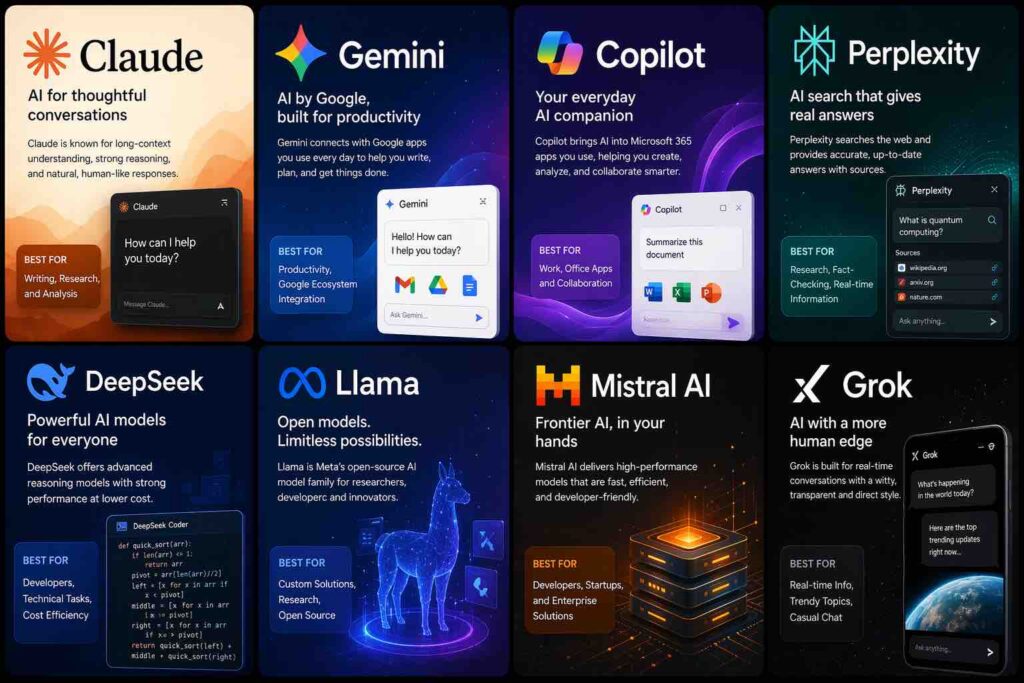
1. Claude by Anthropic — The Best Overall ChatGPT Alternative
If you’ve never tried Claude, this is where you should start.

Built by Anthropic — a company founded specifically around AI safety — Claude approaches language differently than most models. It doesn’t just generate text. It reasons through problems, catches its own mistakes more often than not, and produces writing that genuinely sounds like a thoughtful human wrote it.
What makes Claude stand apart from the crowd is its context window. While most tools lose the thread after a few thousand words, Claude can hold and process over 200,000 tokens at once. That means you can paste an entire research report, a legal contract, or a book chapter, and Claude will analyze it without losing detail.
Where Claude shines:
- Long-form writing, editing, and restructuring
- Summarizing complex documents accurately
- Nuanced reasoning and step-by-step analysis
- Maintaining a consistent voice across long outputs
Where it falls short:
- No native image generation capability
- Fewer third-party app integrations compared to ChatGPT
If your work involves writing, research, analysis, or anything that demands careful, coherent thinking over long outputs, Claude is hard to beat. The free tier is generous enough to test it seriously before committing to anything.
2. Google Gemini — Best for Research and the Google Ecosystem
You probably use Google every day. Gemini takes that relationship and turns it into something genuinely useful.
Unlike most AI tools that rely on frozen training data, Gemini has live access to Google Search built directly into its responses. That means when you ask about something that happened last week, Gemini actually knows. No outdated information. No hallucinated facts dressed up as recent news.
Beyond that, if you’re already working inside Google Docs, Gmail, Drive, or Sheets, Gemini integrates in a way that feels almost invisible. It can draft emails in your voice, summarize long document threads, and generate content directly inside the tools you’re already using.
Where Gemini shines:
- Real-time research with sourced answers
- Native Google Workspace integration
- Multilingual support across dozens of languages
- Handling text, images, audio, and video in one place
Where it falls short:
- Google’s data privacy policies may raise concerns for sensitive work
- Responses can sometimes lean too heavily on search snippets rather than synthesizing a strong answer
If you live inside the Google ecosystem and need an AI that keeps pace with the real world, Gemini is your strongest option.
3. Microsoft Copilot — Best ChatGPT Alternative for Office and Productivity
Your company probably already pays for Microsoft 365. Copilot turns that existing investment into something you can actually feel.
Embedded directly inside Word, Excel, PowerPoint, Outlook, and Teams, Copilot is less of a standalone chatbot and more of a workplace co-pilot — which is exactly what the name implies. You can ask it to draft a report inside Word, summarize a long email thread in Outlook, or create a full slide deck from a bullet-point brief inside PowerPoint.
It runs on the same underlying architecture as ChatGPT but is tuned specifically for professional, document-heavy workflows. For corporate environments, that specialization matters.
Where Copilot shines:
- Deep integration with the entire Microsoft Office suite
- Bing web search built in for real-time answers
- Meeting summaries and action items in Teams
- Free with a basic Microsoft account
Where it falls short:
- The most powerful features require a Microsoft 365 Business subscription
- Less creative and flexible than Claude or ChatGPT for open-ended tasks
If your workflow runs through Microsoft software, Copilot isn’t optional — it’s a genuine upgrade to how you work every day.
4. Perplexity AI — Best for Real-Time Search and Fact-Checking
Here’s the honest truth: if you’re using any AI tool for research without source citations, you’re flying blind.
Perplexity AI was built to fix exactly that problem. It functions like a search engine crossed with an AI assistant, and every single answer it generates comes with cited, clickable sources. You can trace every claim back to where it came from, which changes the trust dynamic entirely.
For journalists, students, academics, and anyone who needs to know that what they’re reading is actually true, Perplexity is in a category of its own.
Where Perplexity shines:
- Real-time web access on every query
- Source citations for every claim it makes
- Clean, distraction-free interface
- Strong free tier with access to multiple AI models
Where it falls short:
- Not designed for creative writing or long-form content generation
- Advanced model access requires a Pro subscription
If accuracy and accountability matter in your work — and they probably should — Perplexity deserves a permanent spot in your toolkit.
5. Mistral AI — Best Open-Source ChatGPT Alternative
Most people haven’t heard of Mistral yet. That’s about to change.
This French AI company has been quietly building some of the most efficient language models in the world. Their models are open-source, which means developers can download, modify, and self-host them without paying licensing fees or sending data to a third-party server.
For businesses operating in the EU, Mistral is particularly compelling. It’s built with GDPR compliance at its core, making it one of the few serious options for organizations that handle sensitive personal data under European privacy law.
Where Mistral shines:
- Open-source models available for self-hosting
- Strong European data privacy compliance
- Fast inference speed with surprisingly capable outputs
- Very competitive on coding and technical tasks
Where it falls short:
- The consumer-facing interface is less polished than competitors
- Multimodal support is more limited
If you’re a developer, a privacy-first business, or an organization that needs to run AI on your own infrastructure, Mistral is worth building into your stack.
6. Perplexity vs. Grok — When You Need Real-Time Social Intelligence
Grok, built by Elon Musk’s xAI team, has a specific advantage that no other tool on this list can replicate: live access to X (formerly Twitter).
If you need to know what people are actually saying about a topic right now — not last month’s blog posts, but real-time public sentiment — Grok can surface that in a way that’s genuinely useful for social media marketers, trend analysts, and journalists covering fast-moving stories.
It also has a deliberately unfiltered, opinionated personality, which some users love and others find grating. That’s a taste call.
Where Grok shines:
- Real-time access to X/Twitter data
- Bold, direct response style
- Image generation built into the platform
Where it falls short:
- Full access requires an X Premium subscription
- Less reliable for academic or professional research
7. DeepSeek — Best Budget-Friendly ChatGPT Alternative
When DeepSeek dropped its R1 model in early 2025, the AI world stopped and paid attention. Here was a model from a Chinese lab that matched — and in some benchmarks beat — the best models from OpenAI and Google, at a fraction of the cost.
For developers and technical teams working with APIs at scale, DeepSeek’s pricing is almost shocking compared to OpenAI’s rates. The coding performance is particularly strong, rivaling GitHub Copilot for many common programming tasks.
Where DeepSeek shines:
- Extremely competitive API pricing
- Strong performance on math, logic, and coding tasks
- Open-source versions available
Where it falls short:
Best ChatGPT Alternatives in 2026: Find the AI That Actually Works for You
You opened a tab, typed your question, and waited. The response came back sounding like it was written by a tired intern copying from a Wikipedia article. Or worse — ChatGPT was down entirely, right when your deadline was breathing down your neck.
If that sounds familiar, you’re in good company.
Millions of people are quietly moving on, not because ChatGPT is bad, but because they’ve realized one tool rarely fits every job. The AI landscape in 2026 looks nothing like it did two years ago. The competition has exploded, and honestly? Some of these ChatGPT alternatives are flat-out better for specific tasks.
This guide is going to walk you through everything — who each tool is built for, what it actually does well, and how to pick the one that fits your life or business.
Why You Might Be Searching for a ChatGPT Alternative
Let’s be honest about what’s driving people to look elsewhere.
ChatGPT still has a massive user base, but the cracks show up fast once you push it hard. You hit the usage limits on the free plan almost instantly. The Plus plan costs money every month, and even then, response quality can swing wildly depending on how busy the servers are.
There’s also the issue of fit. ChatGPT is a generalist. That’s its strength and its weakness. If you’re a developer who needs tight, tested code, a journalist who needs sourced, real-time facts, or a legal professional dealing with dense 80-page contracts, a generalist tool might not cut it anymore.
Here’s what people are genuinely looking for when they search for a ChatGPT alternative:
- Real-time internet access without paying extra
- Better privacy policies and data handling
- Deeper integration with tools they already use
- Faster, more consistent response quality
- Models built specifically for their industry or workflow
The good news is that in 2026, all of those needs are covered — you just need to know where to look.
The Best ChatGPT Alternatives: A Full Breakdown
1. Claude by Anthropic — The Best Overall ChatGPT Alternative
If you’ve never tried Claude, this is where you should start.
Built by Anthropic — a company founded specifically around AI safety — Claude approaches language differently than most models. It doesn’t just generate text. It reasons through problems, catches its own mistakes more often than not, and produces writing that genuinely sounds like a thoughtful human wrote it.
What makes Claude stand apart from the crowd is its context window. While most tools lose the thread after a few thousand words, Claude can hold and process over 200,000 tokens at once. That means you can paste an entire research report, a legal contract, or a book chapter, and Claude will analyze it without losing detail.
Where Claude shines:
- Long-form writing, editing, and restructuring
- Summarizing complex documents accurately
- Nuanced reasoning and step-by-step analysis
- Maintaining a consistent voice across long outputs
Where it falls short:
- No native image generation capability
- Fewer third-party app integrations compared to ChatGPT
If your work involves writing, research, analysis, or anything that demands careful, coherent thinking over long outputs, Claude is hard to beat. The free tier is generous enough to test it seriously before committing to anything.
2. Google Gemini — Best for Research and the Google Ecosystem
You probably use Google every day. Gemini takes that relationship and turns it into something genuinely useful.
Unlike most AI tools that rely on frozen training data, Gemini has live access to Google Search built directly into its responses. That means when you ask about something that happened last week, Gemini actually knows. No outdated information. No hallucinated facts dressed up as recent news.
Beyond that, if you’re already working inside Google Docs, Gmail, Drive, or Sheets, Gemini integrates in a way that feels almost invisible. It can draft emails in your voice, summarize long document threads, and generate content directly inside the tools you’re already using.
Where Gemini shines:
- Real-time research with sourced answers
- Native Google Workspace integration
- Multilingual support across dozens of languages
- Handling text, images, audio, and video in one place
Where it falls short:
- Google’s data privacy policies may raise concerns for sensitive work
- Responses can sometimes lean too heavily on search snippets rather than synthesizing a strong answer
If you live inside the Google ecosystem and need an AI that keeps pace with the real world, Gemini is your strongest option.
3. Microsoft Copilot — Best ChatGPT Alternative for Office and Productivity
Your company probably already pays for Microsoft 365. Copilot turns that existing investment into something you can actually feel.
Embedded directly inside Word, Excel, PowerPoint, Outlook, and Teams, Copilot is less of a standalone chatbot and more of a workplace co-pilot — which is exactly what the name implies. You can ask it to draft a report inside Word, summarize a long email thread in Outlook, or create a full slide deck from a bullet-point brief inside PowerPoint.
It runs on the same underlying architecture as ChatGPT but is tuned specifically for professional, document-heavy workflows. For corporate environments, that specialization matters.
Where Copilot shines:
- Deep integration with the entire Microsoft Office suite
- Bing web search built in for real-time answers
- Meeting summaries and action items in Teams
- Free with a basic Microsoft account
Where it falls short:
- The most powerful features require a Microsoft 365 Business subscription
- Less creative and flexible than Claude or ChatGPT for open-ended tasks
If your workflow runs through Microsoft software, Copilot isn’t optional — it’s a genuine upgrade to how you work every day.
4. Perplexity AI — Best for Real-Time Search and Fact-Checking
Here’s the honest truth: if you’re using any AI tool for research without source citations, you’re flying blind.
Perplexity AI was built to fix exactly that problem. It functions like a search engine crossed with an AI assistant, and every single answer it generates comes with cited, clickable sources. You can trace every claim back to where it came from, which changes the trust dynamic entirely.
For journalists, students, academics, and anyone who needs to know that what they’re reading is actually true, Perplexity is in a category of its own.
Where Perplexity shines:
- Real-time web access on every query
- Source citations for every claim it makes
- Clean, distraction-free interface
- Strong free tier with access to multiple AI models
Where it falls short:
- Not designed for creative writing or long-form content generation
- Advanced model access requires a Pro subscription
If accuracy and accountability matter in your work — and they probably should — Perplexity deserves a permanent spot in your toolkit.
5. Mistral AI — Best Open-Source ChatGPT Alternative
Most people haven’t heard of Mistral yet. That’s about to change.
This French AI company has been quietly building some of the most efficient language models in the world. Their models are open-source, which means developers can download, modify, and self-host them without paying licensing fees or sending data to a third-party server.
For businesses operating in the EU, Mistral is particularly compelling. It’s built with GDPR compliance at its core, making it one of the few serious options for organizations that handle sensitive personal data under European privacy law.
Where Mistral shines:
- Open-source models available for self-hosting
- Strong European data privacy compliance
- Fast inference speed with surprisingly capable outputs
- Very competitive on coding and technical tasks
Where it falls short:
- The consumer-facing interface is less polished than competitors
- Multimodal support is more limited
If you’re a developer, a privacy-first business, or an organization that needs to run AI on your own infrastructure, Mistral is worth building into your stack.
6. Perplexity vs. Grok — When You Need Real-Time Social Intelligence
Grok, built by Elon Musk’s xAI team, has a specific advantage that no other tool on this list can replicate: live access to X (formerly Twitter).
If you need to know what people are actually saying about a topic right now — not last month’s blog posts, but real-time public sentiment — Grok can surface that in a way that’s genuinely useful for social media marketers, trend analysts, and journalists covering fast-moving stories.
It also has a deliberately unfiltered, opinionated personality, which some users love and others find grating. That’s a taste call.
Where Grok shines:
- Real-time access to X/Twitter data
- Bold, direct response style
- Image generation built into the platform
Where it falls short:
- Full access requires an X Premium subscription
- Less reliable for academic or professional research
7. DeepSeek — Best Budget-Friendly ChatGPT Alternative
When DeepSeek dropped its R1 model in early 2025, the AI world stopped and paid attention. Here was a model from a Chinese lab that matched — and in some benchmarks beat — the best models from OpenAI and Google, at a fraction of the cost.
For developers and technical teams working with APIs at scale, DeepSeek’s pricing is almost shocking compared to OpenAI’s rates. The coding performance is particularly strong, rivaling GitHub Copilot for many common programming tasks.
Where DeepSeek shines:
- Extremely competitive API pricing
- Strong performance on math, logic, and coding tasks
- Open-source versions available
Where it falls short:
- Data privacy concerns due to server infrastructure in China
- Less suited to nuanced creative writing
How to Pick the Right ChatGPT Alternative for Your Situation
You don’t need to pick just one. In fact, the most effective users in 2026 are running two or three tools in parallel, each chosen for a specific job.
Here’s a quick framework to guide your decision:
| Your Priority | Best Choice |
|---|---|
| Writing quality and depth | Claude |
| Real-time research with sources | Perplexity AI |
| Microsoft Office integration | Copilot |
| Google Workspace integration | Gemini |
| Privacy and open-source | Mistral AI |
| Social media and trends | Grok |
| Budget and coding | DeepSeek |
Ask yourself three questions before you commit:
- Does this tool need internet access? If yes, Perplexity, Gemini, or Grok are your top options.
- Am I handling sensitive data? If yes, lean toward Mistral or Claude, and read their privacy policies carefully.
- Is this for writing or for technical tasks? Writing → Claude. Technical → DeepSeek or Mistral.
Getting Better Results From Any AI Tool
Switching tools is only half the equation. The other half is knowing how to use them.
A few habits that will immediately improve your outputs regardless of which ChatGPT alternative you’re using:
- Give context upfront. Don’t just ask the question — explain who you are, what you’re trying to accomplish, and what format you need.
- Use role-framing. Starting with “Act as a senior marketing strategist” produces measurably different results than starting cold.
- Break big tasks into steps. Ask the AI to outline first, then expand each section. Don’t ask for a 2,000-word article in one shot.
- Iterate rather than regenerate. Ask the AI to improve a specific paragraph rather than starting over from scratch.
The tools are better than they’ve ever been. But the skill of talking to them well is still very much a human one.
Conclusion: The Right AI Is the One Built for Your Work
The era of defaulting to one AI tool because it was first is over.
In 2026, you have access to a remarkable set of specialized, powerful, genuinely useful ChatGPT alternatives — each built with a different type of user in mind. Claude for the writers and analysts. Gemini for the researchers and Google users. Copilot for the office professionals. Perplexity for the fact-checkers. Mistral for the privacy-conscious and the developers. Grok for the social-media-first thinkers. DeepSeek for the budget-savvy builders.
Your move is simple: pick the one that maps to what you actually do, spend a week with it, and see what changes.
Ready to find your fit? Start with Claude or Perplexity if you’re unsure — both have generous free tiers and will show you what a well-matched AI can do within the first hour of use. The right tool won’t just answer your questions. It’ll change how you approach your work entirely.
FAQ: ChatGPT Alternatives
What is the best free ChatGPT alternative in 2026? Claude, Gemini, and Perplexity AI all offer strong free tiers that give you real, meaningful access without a credit card.
Which ChatGPT alternative is best for coding? DeepSeek and Mistral AI both perform exceptionally well on coding tasks and offer affordable API access for developers.
Is there a ChatGPT alternative that cites its sources? Yes — Perplexity AI is specifically built around sourced, real-time answers and links directly to its references.
Which ChatGPT alternative is safest for sensitive data? Mistral AI (EU-based, GDPR compliant) and Claude (Anthropic’s strict privacy policy) are considered the strongest choices for privacy-sensitive work.
Can I use more than one ChatGPT alternative at the same time? Absolutely. Most experienced users run two or three tools simultaneously, choosing based on the task at hand rather than loyalty to one platform.
How to Pick the Right ChatGPT Alternative for Your Situation
You don’t need to pick just one. In fact, the most effective users in 2026 are running two or three tools in parallel, each chosen for a specific job.
Here’s a quick framework to guide your decision:
| Your Priority | Best Choice |
|---|---|
| Writing quality and depth | Claude |
| Real-time research with sources | Perplexity AI |
| Microsoft Office integration | Copilot |
| Google Workspace integration | Gemini |
| Privacy and open-source | Mistral AI |
| Social media and trends | Grok |
| Budget and coding | DeepSeek |
Ask yourself three questions before you commit:
- Does this tool need internet access? If yes, Perplexity, Gemini, or Grok are your top options.
- Am I handling sensitive data? If yes, lean toward Mistral or Claude, and read their privacy policies carefully.
- Is this for writing or for technical tasks? Writing → Claude. Technical → DeepSeek or Mistral.
Getting Better Results From Any AI Tool
Switching tools is only half the equation. The other half is knowing how to use them.
A few habits that will immediately improve your outputs regardless of which ChatGPT alternative you’re using:
- Give context upfront. Don’t just ask the question — explain who you are, what you’re trying to accomplish, and what format you need.
- Use role-framing. Starting with “Act as a senior marketing strategist” produces measurably different results than starting cold.
- Break big tasks into steps. Ask the AI to outline first, then expand each section. Don’t ask for a 2,000-word article in one shot.
- Iterate rather than regenerate. Ask the AI to improve a specific paragraph rather than starting over from scratch.
The tools are better than they’ve ever been. But the skill of talking to them well is still very much a human one.
Conclusion: The Right AI Is the One Built for Your Work
The era of defaulting to one AI tool because it was first is over.
In 2026, you have access to a remarkable set of specialized, powerful, genuinely useful ChatGPT alternatives — each built with a different type of user in mind. Claude for the writers and analysts. Gemini for the researchers and Google users. Copilot for the office professionals. Perplexity for the fact-checkers. Mistral for the privacy-conscious and the developers. Grok for the social-media-first thinkers. DeepSeek for the budget-savvy builders.
Your move is simple: pick the one that maps to what you actually do, spend a week with it, and see what changes.
Ready to find your fit? Start with Claude or Perplexity if you’re unsure — both have generous free tiers and will show you what a well-matched AI can do within the first hour of use. The right tool won’t just answer your questions. It’ll change how you approach your work entirely.
FAQ: ChatGPT Alternatives
What is the best free ChatGPT alternative in 2026? Claude, Gemini, and Perplexity AI all offer strong free tiers that give you real, meaningful access without a credit card.
Which ChatGPT alternative is best for coding? DeepSeek and Mistral AI both perform exceptionally well on coding tasks and offer affordable API access for developers.
Is there a ChatGPT alternative that cites its sources? Yes — Perplexity AI is specifically built around sourced, real-time answers and links directly to its references.
Which ChatGPT alternative is safest for sensitive data? Mistral AI (EU-based, GDPR compliant) and Claude (Anthropic’s strict privacy policy) are considered the strongest choices for privacy-sensitive work.
Can I use more than one ChatGPT alternative at the same time? Absolutely. Most experienced users run two or three tools simultaneously, choosing based on the task at hand rather than loyalty to one platform.